Google Search Console Guide: Dominate Malaysia Rankings with RN Tech
Thursday, April 10, 2025

In Malaysia's competitive digital marketplace, simply having an online presence is no longer enough to stand out. To secure a position on Google’s first page, businesses must successfully bridge the gap between web design and technical performance. This guide introduces how Google Search Console serves as an essential diagnostic tool for your website, and how RN Tech utilizes these insights to transform your digital asset into a high-ranking, high-performing platform for your business.
What is Google Search Console?
Google Search Console (GSC) is a professional, free tool provided by Google that allows website owners to monitor, maintain, and troubleshoot their site's organic presence directly within Google Search results.
For businesses operating in the Malaysian market, GSC serves as an official communication channel between your platform and Google's crawling algorithms. Instead of relying on guesswork, it offers transparent, data-driven insights that show exactly how Google evaluates, reads, and indexes your digital infrastructure.
Key Capabilities of GSC:
- Track Rankings: Monitor which specific pages are indexed by Google and view their average ranking positions over time.
- Analyze Traffic: Identify the precise keywords and queries that Malaysian users are searching for to find your business.
- Fix Technical Issues: Promptly detect and resolve backend errors, including 404 broken links, mobile usability flaws, or indexing blocks.
- Speed Up Indexing: Submit direct XML sitemaps to help Googlebot discover, crawl, and catalog your newest content faster.
- Optimize Page Experience: Access direct reports on Core Web Vitals to ensure your site meets Google’s official speed and stability standards.
Why Your Business Needs Google Search Console
Understanding the features of GSC is one thing, but leveraging it to drive commercial value is another. For business owners and stakeholders in the competitive Malaysian market, GSC delivers massive strategic advantages:
.png)
An executive overview of Search Ecosystem Optimization. Google Serach Console data serves as the foundation for driving business growth trajectories, monitoring indexing stability, and analyzing localized Malaysian seach queries to maximize sales conversions and ROI.
- Prevents Sudden Ranking Drops: GSC alerts you immediately when Google encounters indexing errors or malware on your site. This allows you to fix issues before they damage your search visibility and traffic.
- Improves Local Conversion Rates: By identifying exactly which local search queries bring users to your site, you can refine your sales pages to match the intent of Malaysian buyers, leading to higher conversions.
- Maintains Digital Integrity & Security: The platform constantly monitors your site for security vulnerabilities, hacked code, or manual penalties, ensuring your corporate reputation remains spotless in the eyes of both Google and your clients.
- Optimizes Marketing ROI: Instead of spending budget on unproven keywords, GSC gives you actual performance data, allowing you to invest your SEO and content marketing resources where they matter most.
Step-by-Step Guide: How to Setup and Use GSC
Setting up Google Search Console correctly ensures that Google can seamlessly communicate with your web server and accurately track your search data in Malaysia. Follow these fundamental steps to get started:
1️⃣ Register and Log In to GSC
Go to the official website: https://search.google.com/search-console. Log in using your corporate Google Workspace account or the personal Google account that is associated with your business assets.
2️⃣ Add Your Website Property
Click the "Add Property" button in the top-left dropdown menu of your dashboard. You will be presented with two property types:

The Google Search Console property selection interface. The left panel shows the Domain method, tracking all subdomains and protocols via DNS verification. The right panel shows the URL Prefix method, limited to one specific URL format.
- Domain Property (Recommended): This covers your root domain, all subdomains (e.g.,
blog.yourdomain.com), and both protocols (httpandhttps). This is the best configuration for a comprehensive corporate setup. - URL Prefix: This only tracks one specific URL format (e.g.,
[https://yourdomain.com/](https://yourdomain.com/)). It is less flexible but useful if you only have access to a specific sub-folder of a website.
3️⃣ Verify Your Website Ownership
To protect your data privacy, Google requires you to prove that you own the website. Choose one of these standard verification methods:
- a. DNS Verification (Best Practice): Copy the TXT record provided by GSC and add it to your domain’s DNS settings inside your hosting control panel (such as Exabytes, ServerFreak, or Cloudflare).
- b. HTML File Upload: Download the unique verification file from GSC and upload it directly to your website’s root directory (
public_html) via cPanel or FTP. - c. HTML Meta Tag: Copy the provided meta tag line and paste it into the backend
<head>section of your website’s homepage HTML code. - d. Google Analytics / Google Tag Manager: Enjoy automatic verification if your website is already connected to Google Analytics or GTM using the exact same Google login credentials.
4️⃣ Submit an XML Sitemap
A sitemap acts as a roadmap that helps Google understand your website's organizational hierarchy, optimizing indexing efficiency.
.png)
The Google Search Console sitemap management dashboard. The top section allows immediate submission of new XML sitemaps, while the bottom analytical table tracks indexing history, crawl dates, and the real-time processing status of your website’s structural URLs.
- Navigate to the Sitemaps menu on the left sidebar.
- Enter your sitemap URL extension (e.g.,
sitemap.xmlorsitemap_index.xml). - Click Submit. Google will now systematically crawl your pages.
5️⃣ Master the URL Inspection Tool
Whenever you publish a brand new service page, an optimized blog article, or update an existing offer, use the top search bar in GSC to paste the specific URL.
- If the page is not yet indexed, click "Request Indexing".
- This signals Googlebot to bypass its standard crawl schedule and index your new content immediately, accelerating your visibility in search results.
Advanced Data Analysis & Performance Optimization
Once Google Search Console begins collecting data, it ceases to be just a monitoring tool and becomes an active growth engine. To bridge the gap between basic setup and top Google rankings, you must actively analyze and optimize these core areas:
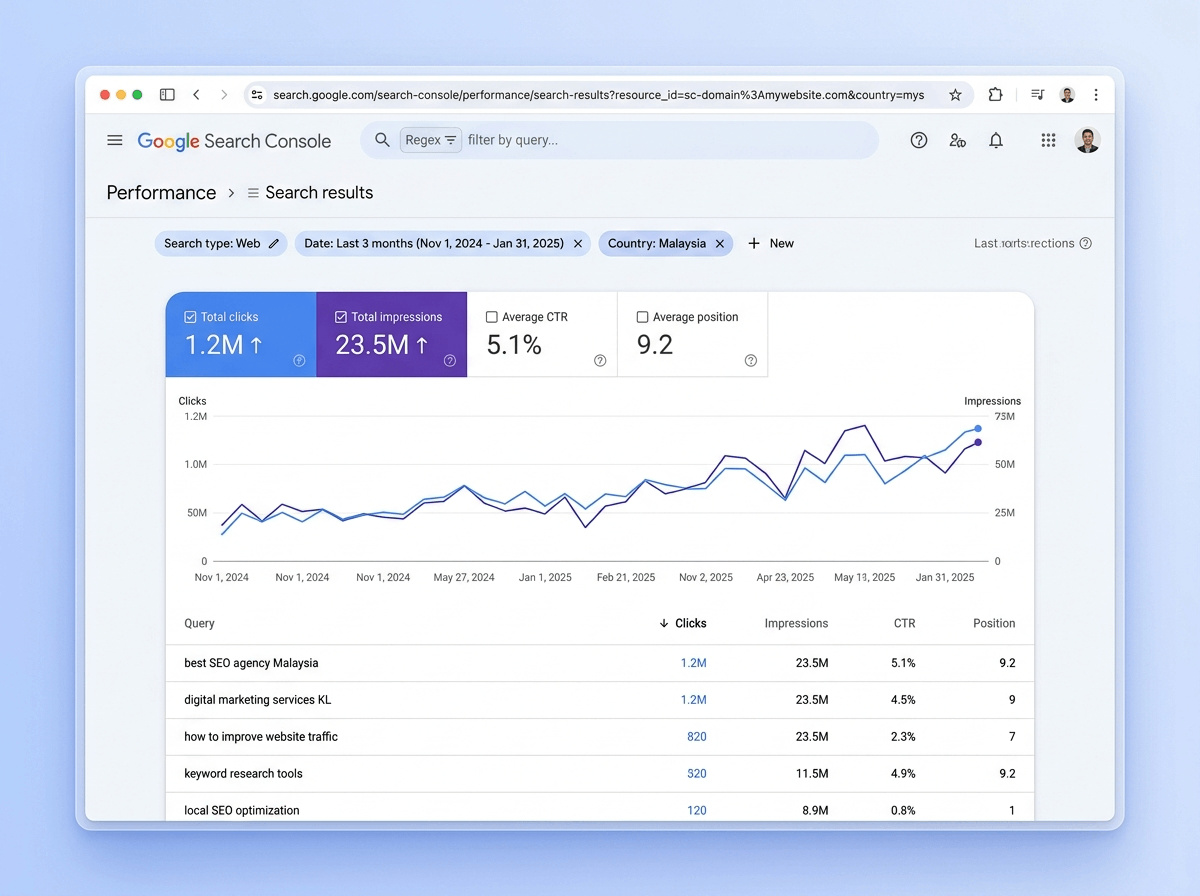
An overview of the Google Search Console Performance dashboard, illustrating a positive organic growth trajectory through key search metrics like total clicks and impressions.
Website Performance Analysis & Local CTR Optimization
- Dashboard Menu: Performance > Search Results
- Core Metrics: Clicks, Impressions, CTR (Click-Through Rate), and Average Position.
Data without action is meaningless. When analyzing your Malaysian search traffic, filter your performance report by Country > Malaysia. Look closely for high-impression keywords that have a low CTR. This indicates that local users are seeing your website in search results but are choosing not to click it.
To fix this, optimize your Meta Titles and Meta Descriptions by adding localized hooks or clear value propositions. Additionally, advanced users can utilize Regex (Regular Expressions) filtering in the GSC query bar to separate informational blog traffic from high-intent transactional queries.
Monitoring Technical Errors & Indexing Stability
- Dashboard Menu: Indexing > Pages (Formerly Coverage)
This technical backend report displays critical errors that can actively harm your search presence, such as 404 broken links, server errors (5xx), redirect loops, or pages accidentally blocked by your robots.txt file.
Fixing these indexing errors ensures that potential B2B clients and customers enjoy a flawless user experience without encountering broken pages. Maintaining a clean indexing profile builds strong structural trust with Google’s crawling algorithms, resulting in superior long-term SEO performance.
Optimizing Core Web Vitals for the Mobile Era
- Dashboard Menu: Experience > Core Web Vitals / Page Experience
Google uses technical user-experience metrics as an official ranking factor. To ensure stable rankings, your web architecture must pass three crucial health indicators:

An optimized Core Web Vitals report dashboard. Achieving pristine green status across Largest Contentful Paint (LCP), Interaction to Next Paint (INP), and Cumulative Layout Shift (CLS) represent the technical gold standar required to secure high ranking and flawless user retention.
- LCP (Largest Contentful Paint): Measures page loading speed. (Target: Under 2.5 seconds).
- INP (Interaction to Next Paint): Measures page responsiveness to user interactions. (Target: Under 200 milliseconds).
- CLS (Cumulative Layout Shift): Measures visual stability during loading. (Target: Shift score under 0.1).
High-speed mobile performance is vital for users browsing on mobile networks across Malaysia. Optimizing these metrics requires advanced frontend refactoring, eliminating render-blocking scripts, and compressing site assets to prevent ranking drops and boost conversion rates.
Security Actions & Algorithmic Insights
- Security & Manual Actions: This vital safety menu flags whether your site has been compromised by malware, hacked by third parties, or hit with a manual spam penalty by a human reviewer at Google.
- Google Discover Feed: For eligible high-traffic sites, this dedicated report tracks how your content performs within Google’s personalized, algorithmic interest feeds—a crucial element for adapting to recent Google Core Updates.
Conclusion: Partner with RN Tech for Search Excellence
Google Search Console provides the foundational diagnostics, but translating raw technical metrics into high-performance commercial value requires specialized architectural expertise. Data alone cannot elevate a brand; it requires precise, strategic execution.
As a dedicated technology and strategy partner, RN Tech orchestrates the entire technical deployment from backend to frontend. We take total ownership of your web infrastructure—resolving complex technical debt, modernizing legacy systems, and engineering pristine Core Web Vitals compliance. Our role is to transform raw search data into a flawless, high-performing digital enterprise engineered to command leadership across Malaysia's competitive digital economy.
Take Control of Your Google Rankings Today!
Don't let hidden technical errors and slow loading speeds push your corporate website down to page two. Google Search Console identifies the performance gaps, but RN Tech delivers the professional execution. Whether you are an ambitious SME or an enterprise expanding your market share in Malaysia, our technical strategists are ready to refactor your web architecture, eliminate technical debt, and elevate your brand to the absolute top of Google.
Stop guessing your search engine strategy. Partner with RN Tech to transform your website into a high-performance, core-web-vitals-approved digital asset.
👉 Contact RN Tech Experts Today for a deep-dive technical audit and let's unlock your true search potential!